Matching
How AVM decides whether software is affected
Matching in AVM is not just a string comparison between software names and CVE records. It combines canonical identification, structured vulnerability conditions, and version-aware evaluation to produce reviewable alert results.
Matching is more than name comparison
AVM starts from observed software records attached to assets. Those software rows preserve raw inventory values such as vendor, product, and version information. Before vulnerability matching can work reliably, AVM attempts to link each software row to canonical vendor and product references.
Once canonical linkage exists, AVM evaluates stored vulnerability conditions. Depending on the available data, this may involve affected CPE relationships, structured criteria trees, and version-range evaluation. The result is not simply “same name equals affected”. It is a decision based on identity, conditions, and available evidence.
Key point: product similarity alone is not enough. AVM is designed to evaluate whether the vulnerability actually applies.
Matching pipeline
1. Raw inventory is collected
AVM receives software observations such as vendor, product, publisher, and version values from import sources.
2. Canonical linking is resolved
Raw names are linked to canonical vendor and product references so matching does not depend only on unstable source-side strings.
3. Vulnerability conditions are loaded
AVM loads affected CPE relationships and structured criteria definitions for stored vulnerabilities.
4. Criteria logic is evaluated
Matching logic evaluates relevant predicates rather than flattening everything into a simple name list.
5. Version conditions are checked
Version-aware evaluation helps distinguish truly affected software from software that only looks similar by name.
6. Alerts are created or updated
If the conditions are satisfied, AVM creates or updates the operational alert state for that software and vulnerability combination.
What matching consumes
Matching decisions are based on several kinds of data, not just one field.
Raw inventory values
Vendor, product, publisher, and version values as observed from the source system.
Canonical references
Canonical vendor and product identities used to stabilize the comparison target.
Vulnerability intelligence
Stored vulnerability records, including affected CPE pairs and structured criteria definitions.
Version evidence
Installed version information used for version-range evaluation where applicable.
Why canonical linking comes first
Inventory sources rarely use one stable naming style. The same vendor or product may appear in multiple forms across tools, operating systems, or collection methods. AVM reduces that ambiguity by linking raw software rows to canonical vendor and product records before vulnerability matching proceeds.
This is also why unresolved mappings are treated as a visible review surface. If canonical identity is unclear, downstream matching should not pretend to be more certain than the input allows.
Without canonical linking
Matching would depend too heavily on inconsistent raw strings.
With canonical linking
Matching can target a normalized product identity that is reusable across imports and review cycles.
Affected CPEs and criteria trees
AVM stores more than one form of vulnerability applicability data. Some evaluations can use affected canonical CPE relationships directly. Others require evaluating structured criteria.
Affected CPE relationships
These represent canonical vendor/product combinations known to be relevant to a vulnerability and are useful for direct lookups and candidate filtering.
Criteria tree structure
These preserve the logical structure of vulnerability conditions so AVM can evaluate them as predicates rather than reducing them to a flat list.
Criteria CPE predicates
These represent specific CPE-based conditions attached to criteria nodes, including information relevant to version evaluation.
This matters because real vulnerability applicability is often conditional. A vulnerability may depend on product identity, platform scope, and version range together.
Why criteria matter
A vulnerability record is not always equivalent to “this product name is vulnerable”. In many cases, the real condition is closer to “this product under these version constraints and software context is vulnerable”.
AVM keeps that logic visible by evaluating structured criteria rather than hiding everything behind a score or collapsing all conditions into product-name matching.
Practical effect: the system can distinguish between “same family”, “same product”, and “actually within the affected condition”.
Version-aware evaluation
Version information is one of the most important inputs to accurate matching. A product family may be associated with a vulnerability, but only within a specific vulnerable range.
AVM therefore evaluates version conditions as part of matching. This helps reduce false positives that would result from using product identity alone.
Why it matters
Two installations of the same product can have different exposure depending on installed version.
What it prevents
It helps avoid treating all named instances of a product as equally vulnerable.
Alert certainty: CONFIRMED vs UNCONFIRMED
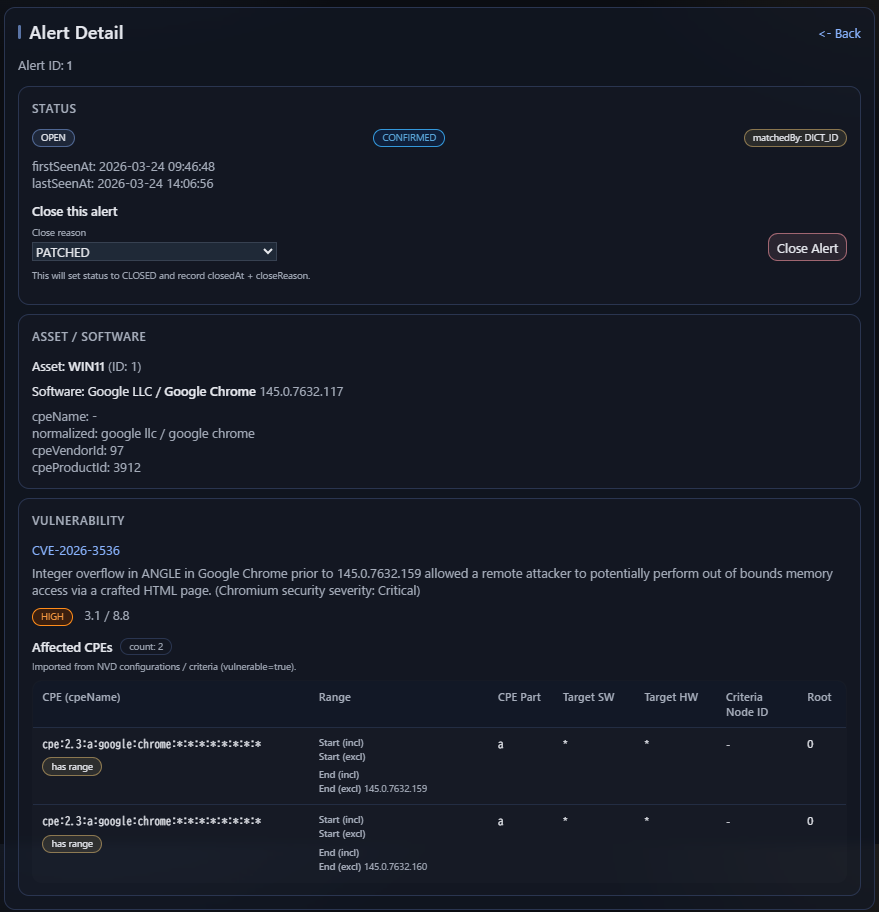
In AVM, alerts carry a certainty value that indicates how confidently the system determined that a vulnerability applies to a software record.
CONFIRMED
The vulnerability is considered to apply clearly to the software.
This usually means the canonical identity was resolved and the relevant version conditions could be evaluated without ambiguity.
UNCONFIRMED
The vulnerability may apply, but AVM cannot fully confirm it from the available evidence.
This typically happens when version information is missing, cannot be parsed reliably, or the vulnerability data does not define a version constraint that allows a precise confirmation.
In practice, this distinction helps separate confirmed exposure from possible exposure that still needs review.
Typical examples of UNCONFIRMED:
- The installed software version is missing
- The installed software version is present but not parseable
- The vulnerability record does not provide a usable version boundary
Key idea: CONFIRMED means AVM could verify applicability with sufficient precision. UNCONFIRMED means AVM found a plausible match, but the available evidence was not strong enough for full confirmation.
Example
Suppose a vulnerability applies to a product family only up to a vulnerable range such as an earlier release line. A system may have software with the same canonical product identity but an installed version outside that vulnerable range.
In that case, AVM should not generate the same result as it would for an actually affected version. The name may match. The product may match. But the version condition does not.
Uncertainty and incomplete evidence
Not every software record contains perfect version data or a complete canonical mapping on first import. AVM is designed to keep these cases visible instead of silently overcommitting to a confident result.
Missing canonical linkage
If the software row is not linked to canonical vendor and product references, downstream matching may remain incomplete.
Weak version evidence
If version information is missing, noisy, or less precise, the system should reflect that limitation in the result.
Review surface
These cases are not hidden. They remain visible through unresolved mappings, review workflows, and explainable matching outcomes.
Failure modes
Missing canonical mapping
A software row cannot be matched reliably if the system does not know what canonical vendor and product it corresponds to.
Insufficient version data
Product identity may be known, but version-aware evaluation may still be limited if the installed version is weak or unavailable.
Ambiguous raw naming
Raw vendor and product strings may be too broad, too noisy, or inconsistent to resolve automatically without review.
Target scope mismatch
Even when names look similar, the vulnerability condition may target a different software context or applicability scope.
Alert generation
Matching in AVM is not complete when a comparison returns true. The operational result must also be recorded. AVM therefore creates or updates alert records as part of the matching cycle.
This keeps alert state explicit. It also allows later review, recalculation, and stale-result cleanup when canonical linkage or matching inputs change.
Operator-visible outcomes
AVM is designed so operators can review not only final alerts but also the quality of the path that led to them.
Resolved and matchable software
Software rows with canonical linkage can proceed to vulnerability evaluation more reliably.
Visible unresolved software
Software rows that remain unresolved stay visible for review rather than disappearing into background logic.
Reviewable alert state
Alerts are a distinct result set that can be recalculated, inspected, and improved as canonical coverage improves.
What AVM is trying to avoid
Blind string matching
Treating name similarity as proof of vulnerability applicability.
Hidden scoring logic
Collapsing applicability decisions into an opaque internal score with little review surface.
Overconfident results
Presenting uncertain or unresolved cases as if they were fully established matches.
Discarded review context
Losing the operational value of unresolved mappings, alias maintenance, and recalculation workflows.
Summary
Matching in AVM is a staged decision process. It starts with raw software observations, stabilizes them through canonical linking, evaluates structured vulnerability conditions, applies version-aware logic, and records the operational result as alerts.
That process is intentionally inspectable. AVM tries to make the matching path visible enough that operators can understand what was resolved, what was inferred, and what still needs review.